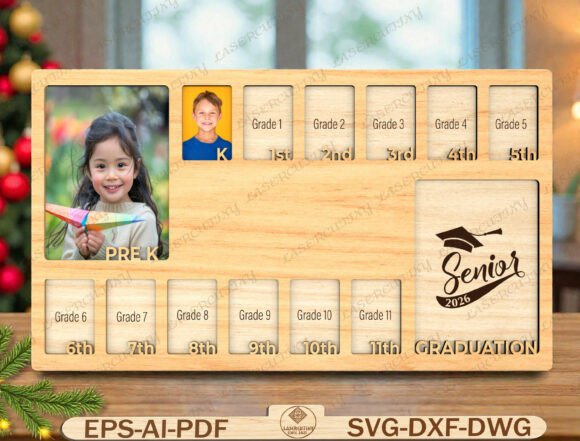
School Years Photo Frame Laser Cut File
Preserving the trajectory of a child’s education is not merely about storing memories; it is about visualizing growth. For creators, educators, and parents who value tangible keepsakes, the School Years Photo Frame Laser Cut File offers a structured approach to documenting milestones from Pre-K through Senior Year. This digital asset transforms a simple collection of photographs into a cohesive narrative board, designed specifically for laser cutting or CNC routing. Unlike standard photo albums that require flipping pages, this layered wooden memory board provides an immediate, at-a-glance overview of academic progress, making it an ideal centerpiece for graduation parties, family celebrations, or permanent home decor.
The utility of this file extends beyond its aesthetic appeal. It serves as a practical tool in the workflow of memory preservation, allowing users to plan their display strategy well in advance. By downloading high-quality vector files in formats such as SVG, DXF, AI, EPS, PDF, and DWG, you gain the flexibility to use them across various platforms and machines, including Glowforge, xTool, OMTech, Thunder Laser, Cricut, and Silhouette Designer Edition. This compatibility ensures that whether you are a professional fabricator producing these frames for clients or a hobbyist working on a personal gift, the execution remains consistent and high-quality.
Understanding the Design and Workflow Integration
The core value of the School Years Photo Frame Laser Cut File lies in its organizational structure. The design features clearly labeled grade slots, ranging from Pre-K to 12th Grade, with a dedicated panel for Senior Graduation. This layout is not arbitrary; it mirrors the chronological progression of formal education, providing a logical framework for data entry—in this case, photographic evidence of each year.
When integrating this file into your creative process, consider the preparation phase. Because the design is layered, it requires precise alignment during assembly. This introduces a step often overlooked in casual crafting: planning the material selection and cut settings. The file’s multi-format support allows you to choose the optimal path based on your equipment. For instance, if you are using a laser cutter, the SVG or DXF files provide clean vector paths that ensure sharp edges and accurate dimensions. If you are utilizing a CNC router, the DWG or AI files may offer better integration with your CAM software.
This versatility supports different business models. Small business owners can offer personalized student gifts by customizing the wood type or stain color before cutting. Educators might use the design for classroom projects where students contribute photos throughout the year. Marketers and bloggers can leverage the concept for content around "graduation ideas" or "DIY home decor," using the file as a case study for successful digital product implementation.
Material Selection and Quality Control
Before initiating the cut, selecting the right material is crucial for the longevity and appearance of the frame. Plywood, MDF, and basswood are common choices, each offering distinct advantages. Plywood provides strength and a natural look, while MDF offers a smooth surface ideal for painting or staining. Basswood is preferred for intricate details due to its fine grain.
Quality control begins with the digital file itself. Ensure that all layers are properly separated and named within your software. Misaligned layers can result in a frame that does not fit together correctly, leading to wasted material and time. Use the provided PDF preview to verify the scale and proportions before committing to a full production run. This preliminary check is a critical step in maintaining efficiency, especially when fulfilling multiple orders or preparing for a specific event like a Class of 2026 celebration.
Implementation Strategies for Different Users
The application of the School Years Photo Frame Laser Cut File varies depending on the user’s role. For entrepreneurs, this file represents a scalable product opportunity. You can source blank frames, cut them using your machine, and sell them as customizable kits. The inclusion of pre-labeled grades reduces the cognitive load for the buyer, making the product more accessible to those who may not want to create their own labels.
For hobbyists and DIY enthusiasts, the process is more hands-on. The joy comes from the assembly and personalization. You might choose to paint each grade slot a different color corresponding to school colors or themes. This adds a layer of customization that enhances the emotional value of the keepsake. The file’s compatibility with Cricut and Silhouette machines means that even those without industrial-grade lasers can participate in creating this item, broadening the potential user base.
Educators and school administrators can utilize this design for end-of-year ceremonies. A large-scale version of the frame can be created using thicker materials and mounted on a wall, serving as a collective memory for a class. Students can place their photos in the designated slots, creating a sense of community and shared history. This application highlights the file’s adaptability beyond individual use, extending into institutional settings where group identity is celebrated.
Photography and Content Curation
Once the physical frame is assembled, the next step is curating the content. The School Years Photo Frame Laser Cut File dictates the number of images required—approximately thirteen, covering Pre-K to Senior Year. This constraint helps in organizing the photo archive. Instead of searching through hundreds of images, focus on capturing one representative photo per year. This could be a portrait, a candid shot, or an image related to a significant achievement in that grade.
Consistency in photography style can enhance the visual impact of the final display. Consider using similar lighting, backgrounds, or poses for each year to create a unified look. Alternatively, embracing variety can showcase the changing interests and personalities of the student over time. Both approaches are valid, but having a clear intention guides the curation process. The labeled slots serve as prompts, ensuring that no milestone is forgotten, particularly the often-overlooked early years like Pre-K.
Long-Term Value and Maintenance
A key advantage of the School Years Photo Frame Laser Cut File is the durability of the resulting product. Wood, when properly finished, lasts for decades, making it a true heirloom. Unlike digital storage, which can become obsolete or corrupted, a physical frame requires no electricity or software updates to view. It occupies physical space in a home, acting as a constant reminder of family history and educational achievements.
Maintenance is minimal. Occasional dusting and avoiding direct sunlight will preserve the wood’s finish and the vibrancy of the photographs. For those concerned about archival quality, using acid-free mats or UV-protective glass over the photos can prevent fading. This long-term perspective aligns with the values of parents and collectors who prioritize enduring quality over temporary trends.
Furthermore, the file’s digital nature allows for easy updates or reprints. If a mistake is made during the initial cut, or if you wish to create additional copies for relatives, the original SVG or DXF file remains intact. This reusability is a significant benefit in both personal and commercial workflows, reducing waste and increasing cost-effectiveness.
Conclusion
The School Years Photo Frame Laser Cut File is more than just a template; it is a comprehensive solution for preserving educational milestones. Its structured design, multi-format compatibility, and suitability for various cutting technologies make it a versatile asset for professionals and hobbyists alike. By integrating this file into your workflow, you create a meaningful, tangible record of growth that stands the test of time. Whether used for a personal family project, a small business inventory, or a classroom celebration, the outcome is a beautifully organized display that honors every step of the journey from Pre-K to graduation.
To get started, select the appropriate file format for your machine, choose your material, and begin curating those special moments. The result will be a cherished keepsake that captures the essence of a decade of learning and development.